MacBook Pro Touch Bar Connector Repair in Guwahati | Professional Touch Bar Connector Service
Get professional MacBook Pro Touch Bar Connector Repair in Guwahati at APPLE REPAIR CENTRE GUWAHATI. We diagnose and repair damaged, loose, corroded, or faulty Touch Bar connectors causing display, touch, power, and control problems.
If your MacBook Pro Touch Bar is not working, the display is black, touch response is intermittent, or Touch Bar controls are not responding, a damaged Touch Bar connector may be responsible.
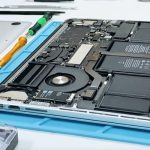
The Touch Bar connector provides the electrical connection between the Touch Bar assembly or flex cable and the MacBook Pro’s internal circuitry. Damaged pins, loose connections, corrosion, or broken solder joints can interrupt display, touch, power, or control signals.
At APPLE REPAIR CENTRE GUWAHATI, we provide professional MacBook Pro Touch Bar Connector Repair services for compatible MacBook Pro models. Our technicians inspect the connector, pins, flex cable, solder joints, Touch Bar power path, and related logic board circuitry before recommending repair or replacement.
MacBook Pro Touch Bar Connector Repair Services
- Touch Bar Connector Diagnosis
- Touch Bar Connector Repair
- Touch Bar Connector Replacement
- Connector Pin Inspection
- Damaged Pin Repair
- Bent Pin Diagnosis
- Loose Connector Repair
- Corroded Connector Inspection
- Connector Cleaning
- Connector Solder Joint Repair
- Touch Bar Flex Cable Inspection
- Touch Bar Flex Replacement
- Touch Bar Signal Testing
- Touch Bar Power Testing
- Touch Bar Display Testing
- Touch Response Testing
- Liquid Damage Inspection
- Corrosion Inspection
- Logic Board Touch Bar Circuit Diagnosis
- Component-Level Connector Repair
- Precision Micro-Soldering
- Complete Touch Bar Function Testing
Common Signs of Touch Bar Connector Problems
Your MacBook Pro may require Touch Bar connector repair if:
- Touch Bar is completely black
- Touch Bar works intermittently
- Touch Bar does not respond to touch
- Display flickers
- Touch Bar controls stop responding
- Touch Bar stops working after flex reconnection
- Problems appear after physical impact
- Touch Bar problems occur after liquid exposure
- Connector pins are damaged
- Connector connection is unstable
- Touch Bar stopped working after previous repair
Causes of Touch Bar Connector Damage
Touch Bar connector problems can be associated with:
- Physical impact
- Damaged connector pins
- Bent pins
- Broken solder joints
- Loose connection
- Liquid exposure
- Corrosion
- Improper flex installation
- Incorrect previous repair
- Excessive pressure on the connector
- Logic board damage
Professional Touch Bar Connector Diagnosis
A Touch Bar problem does not always mean that the connector is faulty. The issue may also originate from the Touch Bar assembly, flex cable, power circuit, or logic board.
Our technicians inspect the connector and test Touch Bar display, touch response, power, and communication before performing repair.
Where technically possible, damaged pins, solder joints, or connector components can be repaired using precision micro-soldering. If the connector is severely damaged, replacement may be recommended.
Touch Bar Connector and Flex Testing
We can test:
- Touch Bar flex connection
- Connector pin condition
- Touch Bar signal continuity
- Display operation
- Touch response
- Brightness
- Control Strip
- Touch Bar power
- Connector solder joints
- Logic board Touch Bar circuit
- Overall Touch Bar stability
Liquid-Damaged Touch Bar Connector Repair
Liquid exposure can cause corrosion around the Touch Bar connector and surrounding logic board area. Even when the Touch Bar initially continues working, corrosion may later cause intermittent or complete failure.
We inspect for:
- Liquid residue
- Corrosion
- Damaged connector pins
- Flex cable damage
- Solder joint damage
- Power circuit faults
- Logic board damage
Where technically possible, affected connectors, components, and board-level circuits may be repaired.
MacBook Pro Models
Touch Bar connectors, flex cables, and internal layouts vary between MacBook Pro generations and configurations. We diagnose compatible MacBook Pro models and determine the correct repair procedure based on the exact device.
Why Choose APPLE REPAIR CENTRE GUWAHATI
- Professional Touch Bar Connector Diagnosis
- Experienced MacBook Repair Technicians
- Advanced Diagnostic Equipment
- Precision Micro-Soldering
- Component-Level Connector Repair
- Flex and Connector Testing
- Display and Touch Testing
- Liquid Damage Inspection
- Logic Board Diagnosis
- Complete Touch Bar Testing
- Transparent Repair Process
- Convenient Location in Ulubari, Guwahati
MacBook Pro Touch Bar Connector Repair in Guwahati
A damaged Touch Bar connector can cause display, touch, brightness, and control functions to fail intermittently or completely. Our technicians carefully inspect the connector, flex cable, Touch Bar assembly, and related logic board circuitry before carrying out repairs.
After repair, the Touch Bar is tested for display operation, touch response, brightness, controls, stability, and overall functionality.
Visit APPLE REPAIR CENTRE GUWAHATI
Address
Apple Repair Centre
Shima Plaza, 4th Floor
Opp. Prag News
Ulubari, Guwahati, Assam 781007
Phone
9127586561
8403921740
Website
Social Media
https://www.facebook.com/applerepaircentreguwahati781008
https://www.instagram.com/applerepaircentreguwahati
X
If your MacBook Pro Touch Bar is black, unresponsive, flickering, or experiencing display, touch, or control problems caused by a damaged connector, visit APPLE REPAIR CENTRE GUWAHATI for professional Touch Bar Connector Repair and complete Touch Bar diagnostics.