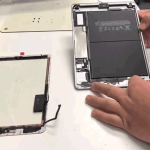
MacBook Not Turning On: Common Causes and Repair Options
Pressing the power button on your MacBook and getting no response can be worrying, especially when important work, files, photos, or business data are stored on the device.
A MacBook that does not turn on does not necessarily mean that the motherboard has failed. The problem can be caused by a discharged battery, charging issue, damaged power adapter, software problem, display fault, liquid damage, or an internal hardware failure.
Before assuming that your MacBook needs a major repair, there are several things you can check.

1. Check the Charger and Power Connection
Start by checking the charging setup.
Make sure the charging cable is properly connected to the MacBook and power adapter. If possible, check the electrical outlet and charging accessories as well.
A damaged cable, faulty adapter, or power connection problem can prevent the MacBook from receiving sufficient power.
If your MacBook shows no signs of charging, the charging system may need further inspection.
2. Give the MacBook Some Time to Charge
If the battery has been completely discharged, the MacBook may not immediately show obvious signs of life after connecting the charger.
Leave it connected to a suitable power source for some time and then try turning it on again.
If there is still no response, the issue may be more than a simple discharged battery.
3. Check for Any Signs of Power
Look and listen carefully when attempting to start the MacBook.
Depending on the model and situation, signs of activity may include:
- Screen illumination
- Fan activity
- Trackpad response
- Keyboard backlight
- Startup sound on supported models
- Charging indicators or other system responses
If the MacBook appears to be running but the display remains black, the problem could be related to the screen rather than the main power system.
4. Check Whether the Display Is the Problem
Sometimes a MacBook may actually be powered on but show no visible image.
If you hear fans, receive other signs of activity, or notice keyboard or trackpad responses but the screen remains black, the display system should be checked.
Possible causes can include display-related faults, cable problems, backlight issues, or other internal hardware problems.
5. Try a Basic Restart
If the MacBook appears frozen or unresponsive, a basic restart may sometimes resolve a temporary software problem.
Disconnect unnecessary external accessories and attempt to restart the MacBook.
If it repeatedly freezes or refuses to start, further diagnosis may be required.
6. Disconnect External Accessories
External devices can occasionally interfere with startup.
Disconnect USB devices, external drives, hubs, monitors, and other accessories and then try starting the MacBook again.
If the MacBook starts normally after removing a particular accessory, that device or connection may be contributing to the problem.
7. Check for Signs of Battery Problems
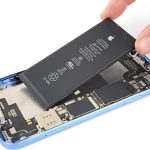
A failed or severely degraded battery can prevent a MacBook from operating normally.
Battery-related symptoms may include:
- Very short battery backup
- Unexpected shutdowns
- Failure to charge
- MacBook working only when connected to power
- Excessive heating
- Battery swelling
If your MacBook had battery problems before it stopped turning on, the battery and charging system should be inspected.
8. Consider Liquid or Moisture Damage
Liquid exposure can cause serious problems even if the MacBook initially appears normal.
If your MacBook has recently been exposed to water, tea, coffee, rain, or another liquid and then stopped turning on, avoid repeatedly attempting to power it on.
Liquid can cause corrosion and electrical damage to internal components.
Professional inspection is recommended after significant liquid exposure.
9. Internal Hardware Failure
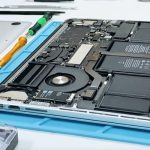
If the basic checks do not resolve the problem, the MacBook may have an internal hardware fault.
Possible causes can include:
- Battery failure
- Charging-system problems
- Power-management issues
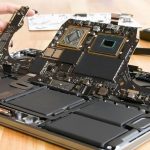
- Logic board faults
- Storage-related problems
- Display problems
- Liquid damage
- Component-level hardware failure
A professional diagnostic inspection can help identify the actual cause.
10. Avoid Unnecessary DIY Repairs
Opening a MacBook without the appropriate tools and experience can result in additional damage.
MacBook components are compact and can be sensitive to static electricity, physical pressure, and incorrect handling.
If the device contains important data, avoid experimenting with unfamiliar repair procedures.
What Should You Do If Your MacBook Does Not Turn On?
Start with these basic checks:
- Check the power outlet.
- Check the charging cable and adapter.
- Connect the MacBook to power.
- Allow the battery time to charge.
- Disconnect unnecessary accessories.
- Check for signs that the MacBook is actually powering on.
- Check whether the problem may be limited to the display.
- Consider any recent liquid exposure or physical damage.
- If there is still no response, arrange professional diagnosis.
When Should You Take Your MacBook to a Repair Centre?
Professional inspection is recommended if:
- The MacBook shows no response to charging
- It does not turn on despite using a suitable power source
- The screen remains black while other components appear active
- It shuts down unexpectedly
- It has charging problems
- It has suffered liquid damage
- The battery appears swollen
- It became damaged after a fall or impact
- It repeatedly fails to start
MacBook Not Turning On? Get It Diagnosed in Guwahati
A MacBook that does not turn on can have many possible causes. Replacing the battery or another component without first identifying the actual problem may result in unnecessary expense.
APPLE REPAIR CENTRE GUWAHATI provides MacBook diagnostics and repair services in Ulubari, Guwahati. Our diagnostic services cover charging problems, battery issues, display faults, liquid damage, power-related problems, motherboard issues, and other MacBook hardware concerns.
Our Business Details
APPLE REPAIR CENTRE GUWAHATI
Apple Repair Centre, Shima Plaza, 4th Floor, Opp. Prag News, Ulubari, Guwahati, Assam 781007
Phone: 9127586561, 8403921740
Website: https://www.applerepairguwahati.com
Connect With Us
Instagram: https://instagram.com/applerepaircentreguwahati
Facebook: https://facebook.com/
Frequently Asked Questions
Why is my MacBook not turning on?
A MacBook may fail to turn on because of a discharged or damaged battery, charging problem, power adapter issue, display fault, software problem, liquid damage, or internal hardware failure.
What should I do if my MacBook shows no signs of power?
Check the charger, power connection, outlet, and charging setup first. If the MacBook still shows no response, professional diagnosis is recommended.
What if my MacBook is on but the screen is black?
The MacBook may have a display-related problem rather than a complete power failure. If there are signs of activity, the display, backlight, and related components should be inspected.
Can liquid damage stop a MacBook from turning on?
Yes. Liquid can damage internal electrical components and may cause the MacBook to stop powering on.
Should I keep trying to turn on a MacBook after water damage?
If liquid exposure is suspected, avoid repeatedly attempting to power on or charge the MacBook. Professional inspection is recommended.
Can a MacBook that does not turn on be repaired?
In many cases, the underlying problem can be diagnosed and repaired, depending on the affected component and extent of damage.
Where can I get my MacBook checked in Guwahati?
You can visit APPLE REPAIR CENTRE GUWAHATI at Shima Plaza, 4th Floor, Opp. Prag News, Ulubari, Guwahati for MacBook diagnosis and repair services.