iPhone Not Charging? 8 Common Reasons and What You Should Do
Is your iPhone not charging when you connect the charging cable? Does the battery percentage remain the same, charge very slowly, or stop charging at a particular percentage? Charging problems are common and can be caused by something as simple as a damaged cable or dirty charging port, or by a more serious internal hardware issue.

Before assuming that your iPhone needs a major repair, there are several things you can check. Here are 8 common reasons why an iPhone may not charge properly and what you can do about them.
1. Check the Charging Cable
A damaged or worn charging cable is one of the first things to check when an iPhone stops charging.
Look for visible damage, bent connectors, loose connections, or signs of wear around the cable ends. If possible, try another compatible charging cable to determine whether the cable is causing the problem.
If your iPhone charges normally with another cable, the original cable may be faulty.
2. Check the Power Adapter
The problem may not always be with the iPhone. A damaged or faulty power adapter can prevent the device from receiving power correctly.
Try another compatible power adapter and check whether the charging behaviour changes. You can also try another electrical outlet to eliminate a power-source problem.
3. Check the iPhone Charging Port
Dust, lint, and debris can accumulate inside the charging port, especially when the phone is regularly carried in a pocket or bag.
A blocked port can prevent the charging connector from making proper contact.
If your cable feels loose, disconnects easily, or only charges when held at a particular angle, the charging port should be inspected.
Avoid using sharp metal objects to clean the port because they can damage delicate internal contacts.
4. Restart Your iPhone
Sometimes charging behaviour can be affected by a temporary software issue.
Restarting your iPhone is a simple troubleshooting step that can help resolve temporary software problems.
After restarting, connect the charger again and check whether the battery begins charging normally.
5. Check for Excessive Heat or Cold
Extreme temperatures can affect iPhone charging.
If your iPhone becomes very hot while charging or has been exposed to very cold conditions, charging may temporarily slow down or stop until the device returns to a suitable temperature.
Keep the phone in a normal indoor environment and allow it to return to a comfortable temperature before trying again.
6. Check for Liquid Exposure
If your iPhone has recently been exposed to water or another liquid, charging may be restricted to protect the device.
Do not force the charging cable into the port if you suspect that there is moisture present.
Liquid inside the charging port or device can potentially cause corrosion and other hardware problems.
If the phone has been exposed to significant moisture, professional inspection is recommended.
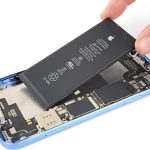
7. Check the Battery Condition
An aging or damaged battery can sometimes cause charging problems.
If your iPhone has poor battery backup, unexpected shutdowns, overheating, or unusual battery percentage changes along with charging problems, the battery may require inspection.
A professional diagnostic check can help determine whether the battery is responsible.
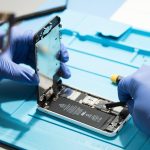
8. The Problem Could Be Internal Hardware
If you have tried different cables, adapters, and power outlets and the iPhone still does not charge, the issue may be inside the device.
Possible causes can include:
- Damaged charging port
- Charging connector problems
- Battery-related faults
- Charging-system problems
- Power-management component issues
- Liquid damage
- Motherboard-related faults
In these situations, replacing the cable or adapter may not solve the problem. A proper diagnostic inspection is recommended.
What Should You Do If Your iPhone Is Not Charging?
Try these basic checks first:
- Try another compatible charging cable.
- Try another power adapter.
- Try another electrical outlet.
- Check the charging port for visible debris.
- Restart the iPhone.
- Allow the device to cool down if it is hot.
- Consider whether the phone has recently been exposed to liquid.
- If the problem continues, get the device professionally diagnosed.
When Should You Visit a Repair Centre?
Professional inspection is recommended if your iPhone:
- Does not charge with multiple compatible cables
- Only charges when the cable is held at a certain angle
- Shows a charging symbol but the battery percentage does not increase
- Stops charging repeatedly
- Gets unusually hot while charging
- Has a loose or physically damaged charging port
- Has recently suffered liquid damage
- Has battery or power-related symptoms
iPhone Charging Port Repair and Diagnosis in Guwahati
If your iPhone is not charging properly, the actual cause should be identified before replacing components unnecessarily.
APPLE REPAIR CENTRE GUWAHATI provides iPhone charging problem diagnosis and repair services in Ulubari, Guwahati. Our repair services cover charging port problems, battery-related issues, liquid damage inspection, motherboard diagnosis, and other common iPhone hardware problems.
Our Business Details
APPLE REPAIR CENTRE GUWAHATI
Apple Repair Centre, Shima Plaza, 4th Floor, Opp. Prag News, Ulubari, Guwahati, Assam 781007
Phone: 9127586561, 8403921740
Website: https://www.applerepairguwahati.com
Connect With Us
Instagram: https://instagram.com/applerepaircentreguwahati
Facebook: https://facebook.com/
Frequently Asked Questions
Why is my iPhone not charging?
An iPhone may stop charging because of a damaged cable, faulty adapter, blocked charging port, software issue, battery problem, liquid exposure, or internal hardware fault.
Why does my iPhone charge only at a certain angle?
This can indicate a damaged or worn charging cable or a problem with the charging port. The port should be inspected rather than repeatedly forcing the cable into position.
Can dust stop an iPhone from charging?
Yes. Accumulated dust and lint inside the charging port can interfere with the connection between the charging cable and the port.
Can water damage cause charging problems?
Yes. Liquid exposure can affect the charging port and internal components. If your iPhone has been exposed to liquid, professional inspection is recommended.
How much does iPhone charging port repair cost in Guwahati?
The cost depends on the iPhone model and the actual cause of the charging problem. A diagnostic inspection can help determine the required repair before the final cost is confirmed.
Where can I get an iPhone charging problem checked in Guwahati?
You can visit APPLE REPAIR CENTRE GUWAHATI at Shima Plaza, 4th Floor, Opp. Prag News, Ulubari, Guwahati, Assam for iPhone charging diagnostics and repair services.