MacBook Liquid Damage: What You Should Do Immediately
Accidentally spilling water, coffee, tea, juice, or another liquid on your MacBook can be stressful. A small spill can potentially reach the keyboard, trackpad, charging components, or internal electronics.

Even if the MacBook continues working after a spill, liquid damage should not be ignored. Moisture can remain inside the device and may later cause corrosion, electrical problems, or component failure.
If your MacBook has been exposed to liquid in Guwahati, the actions you take immediately can help reduce the risk of further damage.
1. Stop Using the MacBook Immediately
If liquid has spilled on your MacBook, stop using it as soon as possible.
Do not continue typing, browsing, watching videos, or testing different functions just because the MacBook still appears to work.
Liquid can move through internal areas while the device is operating.
2. Disconnect the Charger
If your MacBook is connected to power, disconnect the charger if it is safe to do so.
Avoid touching electrical connections with wet hands.
Do not reconnect the charger while you suspect that moisture remains inside the MacBook.
3. Shut Down the MacBook
If the MacBook is still powered on and you can safely shut it down, turn it off.
The goal is to prevent electricity from continuing to flow through areas that may have been exposed to liquid.
If the device has already shut down, do not repeatedly attempt to turn it back on.
4. Disconnect External Accessories
Remove connected accessories such as:
- USB devices
- External hard drives
- Hubs
- Memory card adapters
- External displays
- Headphones
- Other peripherals
This helps isolate the MacBook and prevents unnecessary connections while moisture may be present.
5. Remove the MacBook From the Liquid
Move the MacBook away from the source of the spill and place it on a safe, dry surface.
Gently wipe visible liquid from the exterior using a soft, lint-free cloth.
Avoid pressing keys repeatedly while trying to remove the liquid.
6. Do Not Use a Hair Dryer
Using a hair dryer may seem like an easy way to dry a wet MacBook, but direct heat can potentially damage components.
Avoid hair dryers, heaters, radiators, and other strong heat sources.
Do not try to speed up the drying process using extreme temperatures.
7. Do Not Put the MacBook in Rice
Rice is a popular home remedy for wet electronics, but it is not a reliable solution for liquid damage.
Rice cannot remove liquid that has already reached internal components and can introduce dust or particles into openings.
A MacBook that has experienced significant liquid exposure should be professionally inspected.
8. Do Not Keep Turning It On to Test It
One of the biggest mistakes after a liquid spill is repeatedly switching the MacBook on to see whether it still works.
The fact that the MacBook starts normally does not mean there is no internal damage.
Liquid can remain inside the device and cause corrosion or electrical problems later.
9. Take Note of the Type of Liquid
The type of liquid can be important.
Plain water and liquids containing sugar, salt, milk, or other substances can behave differently when they enter electronics.
Coffee, tea, soft drinks, juice, and other liquids may leave residues that can contribute to corrosion or contamination.
Tell the technician what liquid was spilled and approximately where it entered the MacBook.
10. Get Professional Inspection as Soon as Possible
If a significant amount of liquid entered your MacBook, professional inspection is recommended.
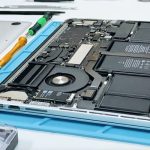
A technician can inspect areas such as:
- Keyboard
- Trackpad
- Battery
- Charging system
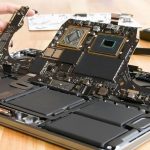
- Logic board
- Display connections
- Internal connectors
- Other affected components
The purpose of diagnosis is to determine the extent of the damage and identify components that may require cleaning, repair, or replacement.
What If My MacBook Still Works After a Liquid Spill?
A working MacBook is not necessarily free from liquid damage.
Some problems can appear hours or days after exposure as corrosion develops.
Watch for:
- Keyboard keys becoming unresponsive
- Trackpad problems
- Charging issues
- Battery draining quickly
- Unexpected shutdowns
- Screen flickering
- Speaker problems
- Overheating
- Wi-Fi or connectivity issues
- MacBook failing to turn on
If any unusual symptoms appear, arrange professional inspection.
What If Coffee or Tea Spills on a MacBook?
Coffee and tea can be more concerning than plain water, particularly when sugar, milk, or other additives are present.
Immediately disconnect power, shut down the MacBook if possible, and avoid repeatedly testing the device.
Professional liquid-damage inspection is recommended because residues can remain inside the device even after the exterior appears dry.
What If the MacBook Was Completely Submerged?
If your MacBook has been exposed to a large amount of liquid or completely submerged, avoid turning it on or connecting it to power.
Do not attempt to dry the internal components yourself.
Professional inspection should be arranged as soon as possible.
Can Liquid-Damaged MacBooks Be Repaired?
Repair depends on the amount of liquid exposure, the type of liquid, how long the device was exposed, and which components were affected.
Some devices may require internal cleaning and component-level repair, while severe damage may require replacement of affected components.
The MacBook model also influences the available repair options.
MacBook Liquid Damage Inspection in Guwahati
If your MacBook has suffered a liquid spill, acting quickly is important. Avoid charging the device, repeatedly turning it on, or attempting risky home repairs.
APPLE REPAIR CENTRE GUWAHATI provides MacBook liquid damage inspection and diagnostic services in Ulubari, Guwahati. Devices can be checked for keyboard problems, charging faults, battery issues, display problems, logic board faults, corrosion, and other liquid-related damage.
Our Business Details
APPLE REPAIR CENTRE GUWAHATI
Apple Repair Centre, Shima Plaza, 4th Floor, Opp. Prag News, Ulubari, Guwahati, Assam 781007
Phone: 9127586561, 8403921740
Website: https://www.applerepairguwahati.com
Connect With Us
Instagram: https://instagram.com/applerepaircentreguwahati
Facebook: https://facebook.com/
Frequently Asked Questions
What should I do immediately after spilling liquid on my MacBook?
Stop using the MacBook, disconnect the charger if safe, shut it down, remove external accessories, and avoid turning it back on repeatedly. Professional inspection is recommended after significant liquid exposure.
Can I use a hair dryer to dry my MacBook?
It is better to avoid direct heat. A hair dryer can potentially damage sensitive components.
Should I put my wet MacBook in rice?
No. Rice is not a reliable method for removing liquid from internal electronics and can introduce particles into the device.
Can a MacBook work normally after liquid damage?
Yes, it may continue working initially. However, internal corrosion or other problems can develop later.
Is coffee or tea dangerous for a MacBook?
Yes. Coffee and tea can leave residues, particularly when they contain sugar, milk, or other additives. Professional inspection is recommended after a significant spill.
Can liquid damage a MacBook motherboard?
Yes. Liquid can reach the logic board and other internal components and potentially cause corrosion or electrical faults.
Can a liquid-damaged MacBook be repaired?
Depending on the extent of the damage, some liquid-damaged MacBooks can be repaired. A professional diagnosis is necessary to determine the affected components and available repair options.
Where can I get my liquid-damaged MacBook checked in Guwahati?
You can visit APPLE REPAIR CENTRE GUWAHATI at Shima Plaza, 4th Floor, Opp. Prag News, Ulubari, Guwahati for MacBook liquid damage inspection and repair services.