iPad Not Charging? Common Causes and Repair Solutions
Is your iPad not charging when you connect the charging cable? Does the battery percentage remain stuck, charge very slowly, or stop charging unexpectedly?

Charging problems can be caused by a damaged cable, faulty adapter, blocked charging port, battery degradation, software issues, liquid exposure, or an internal hardware fault.
Before assuming that your iPad needs a major repair, there are several things you can check.
1. Check the Charging Cable
A damaged or worn charging cable is one of the first things to check.
Inspect the cable for visible damage, bent connectors, loose sections, or signs of wear.
If possible, try another suitable charging cable. If the iPad charges normally with the replacement cable, the original cable may be the problem.
2. Check the Power Adapter
The charging adapter can also cause charging problems.
Try another compatible power adapter and electrical outlet to determine whether the problem is related to the power source.
If the iPad still does not charge with a known-good charging setup, the issue may be with the iPad itself.
3. Inspect the iPad Charging Port
Dust, lint, and debris can collect inside the charging port and interfere with the connection.
If the cable does not fit properly, feels loose, or disconnects easily, the port should be inspected.
Avoid inserting pins, needles, knives, or other sharp objects into the charging port because they can damage the internal contacts.
4. Restart Your iPad
A temporary software issue can sometimes affect charging.
Restart the iPad and connect it to a suitable charger again.
If charging starts normally after restarting but the problem keeps returning, further diagnosis may be required.
5. Check for Liquid Exposure
If your iPad has recently been exposed to water, rain, or another liquid, charging problems may occur.
Do not connect the charger if you suspect that moisture is present in the charging port.
Liquid can cause corrosion and electrical problems inside the device.
If charging problems began after liquid exposure, professional inspection is recommended.
6. Check the Battery Condition
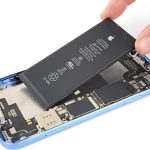
An aging or damaged battery can affect charging performance.
Possible battery-related symptoms include:
- Very short battery backup
- Battery percentage dropping quickly
- Unexpected shutdowns
- Slow or inconsistent charging
- iPad becoming unusually warm
- Battery percentage changing unexpectedly
If several of these symptoms occur together, the battery should be checked.
7. Check Whether the iPad Is Too Hot
Temperature can affect charging.
If the iPad becomes unusually hot while charging or has been left in direct sunlight, charging may slow down or stop temporarily.
Move the iPad to a normal indoor environment and allow it to cool naturally before testing it again.
Avoid using extreme cooling methods.
8. Check for Software Problems
Software can sometimes contribute to unusual charging behaviour.
Make sure the iPad is running an appropriate version of iPadOS and check whether the problem occurs across different charging sessions.
If charging problems continue despite normal software operation, hardware diagnosis may be required.
9. Test With Another Suitable Charging Setup
Try changing one component at a time.
For example:
- Another charging cable
- Another compatible adapter
- Another electrical outlet
This can help identify whether the issue is caused by the charging accessories or the iPad itself.
If multiple charging setups produce the same result, the iPad should be inspected.
10. The Charging System May Have a Hardware Fault
If the iPad does not charge after testing suitable cables and adapters, the problem may involve internal hardware.
Possible causes can include:
- Damaged charging port
- Battery fault
- Charging-system problem
- Liquid damage
- Internal connection problem
- Power-management issue
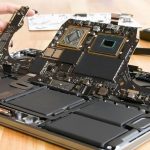
- Motherboard-related fault
A professional diagnostic inspection can help determine the actual cause.
Signs Your iPad Needs Professional Charging Repair
Consider getting your iPad checked if:
- It does not charge with multiple suitable cables
- The charging cable feels loose
- Charging starts and stops repeatedly
- The battery percentage does not increase
- Charging is unusually slow
- The iPad becomes hot while charging
- The charging port appears damaged
- The problem started after liquid exposure
- The iPad stopped charging after a fall
- Basic troubleshooting does not solve the problem
What Should You Do If Your iPad Is Not Charging?
Before visiting a repair centre, try these basic steps:
- Test another suitable charging cable.
- Test another compatible power adapter.
- Try another electrical outlet.
- Check the charging port for visible debris.
- Restart the iPad.
- Allow the device to cool if it is hot.
- Consider whether it was recently exposed to liquid.
- If the problem continues, arrange professional diagnosis.
iPad Charging Port Repair and Diagnosis in Guwahati
An iPad that is not charging may have a simple accessory problem or an internal hardware fault. Proper diagnosis can help identify the cause before unnecessary parts are replaced.
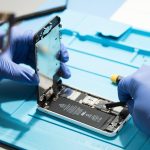
APPLE REPAIR CENTRE GUWAHATI provides iPad charging diagnostics and repair services in Ulubari, Guwahati. Devices can be checked for charging port problems, battery faults, liquid damage, charging-system issues, and other iPad hardware concerns.
Our Business Details
APPLE REPAIR CENTRE GUWAHATI
Apple Repair Centre, Shima Plaza, 4th Floor, Opp. Prag News, Ulubari, Guwahati, Assam 781007
Phone: 9127586561, 8403921740
Website: https://www.applerepairguwahati.com
Connect With Us
Instagram: https://instagram.com/applerepaircentreguwahati
Facebook: https://facebook.com/
Frequently Asked Questions
Why is my iPad not charging?
An iPad may not charge because of a damaged cable, faulty adapter, blocked charging port, battery problem, software issue, liquid exposure, or internal hardware fault.
Why does my iPad charge slowly?
Slow charging can be caused by the charging adapter, cable, battery condition, temperature, charging port, or other internal hardware issues.
Can dust stop an iPad from charging?
Yes. Dust and lint inside the charging port can prevent the charging connector from making proper contact.
Can water damage cause iPad charging problems?
Yes. Liquid can damage the charging port and internal components and may cause charging to stop working.
Why does my iPad charge only when the cable is moved?
This can indicate a damaged cable, blocked port, worn charging contacts, or physical damage to the charging port.
Can an iPad charging port be repaired?
Depending on the iPad model and type of damage, the charging port or related components may be repairable. A professional diagnosis is recommended first.
Where can I get my iPad charging problem checked in Guwahati?
You can visit APPLE REPAIR CENTRE GUWAHATI at Shima Plaza, 4th Floor, Opp. Prag News, Ulubari, Guwahati for iPad charging diagnosis and repair services.